Showing posts with label in. Show all posts
Showing posts with label in. Show all posts
Friday, April 29, 2016
Repairing frozen Dash in Ubuntu 12 10
Ubuntu 12.10 is the newest Ubuntu distribution of the Linux operating system. After you install or upgrade to Ubuntu 12.10, its Dash search window might not work correctly. Intermittently, Dash can freeze (hang up) after you type only a few characters into its search field. This document can probably help you repair Dash by installing a proprietary video driver.
Authors Note: I experienced this problem on my medium-powered (AMD dual-core, 2 GB memory), rebuilt PC, into which I had installed a new motherboard. I use this machine as my standby and experimental PC, on which I ran Ubuntu 12.04 with no Dash problems.
To repair frozen dash by installing a proprietary video driver, do the following:
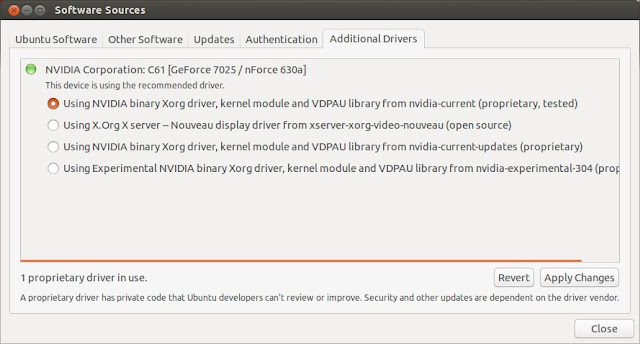
- In the launcher, click System Settings to display its window, click Software Sourcesto display its window, and then click the Additional Drivers tab to display its page.
- Select an appropriate driver, such as the NVIDIA binary Xorg - - (proprietary, tested) driver shown below, and then click Apply Changes.
- When prompted, type your password, and then click Authenticate.
- Close the Software Sources window.
- Reboot your PC.


HOW TO DRAW A SNOWMAN IN MS WORD
MICROSOFT WORD DRAWING PROJECT No. 46
TITLE: HOW TO DRAW A SNOWMAN IN MS WORD
TYPE: CLIP ART
Clip art images are small size pictures that can be easily added to the document. They can either be JPEG, Vector or other formats. The purpose of adding clip art images into the document is to illustrate or enhance its appearance. There are many ways to obtain clip art images but have you ever tried creating clip art images on your own with the word processor? Images created in MS Word are vector graphics and they are saved as DOC files. Many of the drawing projects featured on my blog can actually be used as clip art images. Here is a simple drawing project and I hope readers can try it out, that is drawing a snowman in MS Word. First, draw a picture of the snowman on a piece of paper. This practice enables you to know the details of the subject well. Later on, you can proceed to draw it on the computer using your creativity.
Use only the Curve line tool to draw the picture of the snowman. I love to use the Curve line tool to draw organic shape objects because the results will be quite natural. Start by drawing three round shapes of different sizes. Then, create the details for the head. After that, complete the details for the body. Finally, fill the shapes with colours of your choice.

This digital drawing of a snowman was drawn with MS word 2003 Drawing program.
THE DISSECTED DRAWING:

A total of 36 drawing objects were created to form the picture of the snowman.
Study Comparing Whey Pea Protein Finds Superior Gains in Sleeve Size W Pea But the Results May be Misleading
 |
| One study wouldnt be enough to prove that pea is superior to whey as muscle builder, anyways. |
You can learn more about protein intake at the SuppVersity

Protein Timing DOES Matter!

5x More Than the FDA Allows!

Protein requ. of athletes

High EAA protein for fat loss

Fast vs. slow protein

Less Fat, More Muscle!
Recovery between sets was identical for all workouts: 2–3 minutes. The load used for each exercise was regularly adapted during training depending on individuals’ maximum load (1-RM, one maximum repetition, evaluated every two weeks)."All subjects followed the same training routine, three times per week with a rest day between each session. Training was based on three exercises involving the elbow flexor and extensor muscles. The exercises soliciting the flexor muscles were arm curl and lateral pulldown. In the arm curl exercise, subjects sat with weights in their hands with a ~40° trunk/arm angle. They had to flex/extend the forearm over the arm. For the lateral pull-down, subjects sat with a bar in their hands above the head. They had to flex/extend the forearm over the arm with a vertical movement. The exercise soliciting the extensors was the bench press. Subjects were lying on their backs with a bar in their hands with a 90° trunk/arm angle, arms extended, and had to flex and extend their upper limbs vertically. Throughout the training program, the number of sets was progressively increased from 2 to 5 while the number of repetitions was reduced in parallel from 15 to 5 repetitions maximum (RM). In the final week, the subjects did three sets of 5 RM in order to preclude any fatigue for the D84 tests" (Babault. 2015).
Figure 1: Overview of the study design.

 |
| Pea protein (PE) is similarly satiating as whey (WH) (Lang. 1998). |
 |
| Figure 2: Muscle thickness in the 3 groups at baseline after 42 and 84 days. There was only a trend (£) for increased gains in the pea protein group (Babault. 2015). |
Faulty measurements due to messed up timing?
That sounds great, but since the time of measurement is not mentioned, it may well be that all the values are fundamentally flawed. Why?
Well, as a SuppVersity reader you know that even in leg muscles, which are muss less prone to "the pump", "Cell Swelling Keeps Muscles "Pumped" For More Than 52h. Size Increases of Up to 16% After a Single Leg Workout!" (learn more).
Practically speaking, this means that the "size measurements" in the study at hand may be worthless if the scientists didnt wait for at least 72h-96h before they measured the sleeve sizes of their subjects.
Dont trust sleeve size measurements, unless you know that they were taken at least 72h after the last workout. If they are taken before, the "gains" may well be a mere result of cell swelling. You dont believe that? Well reread my article "Cell Swelling Keeps Muscles Pumped For More Than 52h. Size Increases of Up to 16% After a Single Leg Workout!" (read it).
The absence of information on the time-point at which the sleeve sizes were measured (suggestive of immediately post) and the fact that the strength gains do not reflect the alleged superiority of pea protein as muscle builders (see Figure 3) put a huge question mark behind the assumption that pea protein tends to produce greater muscle gains than whey. |
| Figure 3: It is strange that the "superior muscle builder" triggers the lowest gains in maximal isometric contractile force. Even the placebo group had greater strength gains - despite a lack of sign. differences at baseline (Babault. 2015). |
 |
| On paper, the amino acid profile of whey looks more anabolic (higher BCAA content). |
If we also take into consideration that the "size" gains are actually gains in sleeve size (not reliable DXA measurements) which may have been taken way too early after the workouts to reflect actual muscle gains, we dont even have to raise the question whether the fact that the French company Roquette, the producer of NUTRALYS® pea protein, sponsored the study may have constituted an obviously subliminal bias ;-) Anyways, I would not yet replace my whey protein with pea protein isolates | Comment Facebook!
- Babault, et al. "Pea proteins oral supplementation promotes muscle thickness gains during resistance training: a double-blind, randomized, Placebo-controlled clinical trial vs. Whey protein." Journal of the International Society of Sports Nutrition 12:3 (2015).
- Buckley, Jonathan D., et al. "Supplementation with a whey protein hydrolysate enhances recovery of muscle force-generating capacity following eccentric exercise." Journal of Science and Medicine in Sport 13.1 (2010): 178-181.
- Lang, Vincent, et al. "Satiating effect of proteins in healthy subjects: a comparison of egg albumin, casein, gelatin, soy protein, pea protein, and wheat gluten." The American journal of clinical nutrition 67.6 (1998): 1197-1204.
- Ndiaye, Fatou, et al. "Anti-oxidant, anti-inflammatory and immunomodulating properties of an enzymatic protein hydrolysate from yellow field pea seeds." European journal of nutrition 51.1 (2012): 29-37.
- Kerasioti, Efthalia, et al. "Anti-inflammatory effects of a special carbohydrate–whey protein cake after exhaustive cycling in humans." Food and Chemical Toxicology 61 (2013): 42-46.
- Sirtori, Cesare R., et al. "Hypocholesterolaemic effects of lupin protein and pea protein/fibre combinations in moderately hypercholesterolaemic individuals." British journal of nutrition 107.08 (2012): 1176-1183.
- Smith, Christopher E., et al. "The effect of yellow pea protein and fibre on short-term food intake, subjective appetite and glycaemic response in healthy young men." British Journal of Nutrition 108.S1 (2012): S74-S80.
- Sugawara, Keiyu, et al. "Effect of anti-inflammatory supplementation with whey peptide and exercise therapy in patients with COPD." Respiratory medicine 106.11 (2012): 1526-1534.
HOW TO DRAW A HOUSE IN MS WORD
MICROSOFT WORD DRAWING PROJECT No. 12 (PART 1)
TITLE : HOW TO DRAW A ONE POINT PERSPECTIVE MODEL HOUSE IN MS WORD
TYPE : ILLUSTRATION

© Chang Hon Woon
Here is the model of a modest brick house complete with a chimney that was drawn entirely by Freeform line tool. First, start with the side portion. Secondly, draw the front portion of the house. Next, draw the roof, and so on. Some knowledge about linear perspective is needed to create this drawing so that the drawing will not be out of proportion. I will show you later how to use this drawing project to teach an art lesson about one point perspective. I actually tried the idea of teaching students the basics of computer graphics with MS Word in my school many years ago. My main intention was to expose them to the concept of computer graphics. I took my students to the school computer lab a few times and taught them how to draw pictures with the MS Word Drawing toolbar (Microsoft Office 95 and 97) and they enjoyed the lessons. The picture that I taught them to draw was an adult ant (with wings) which could be drawn using only the Oval and Moon shapes and Line tool for the feelers. Let me leave this project like that for the time being (without the dissected drawing parts) for readers to practise drawing the model house on their own as homework. I will show how the drawing is done in my next post. As the saying goes, practice makes perfect. See you then!
Thursday, April 28, 2016
When Whey Casein Unite in the Spirit of True Physique Improvements BCAAs Glutamine Better Shut the F Up
 |
| Ever wondered, why you hit a plateau, "although" youve started to use this whey protein w/ extra aminos? |
You can learn more about protein intake at the SuppVersity

Are You Protein Wheysting?

Cod protein for recovery

Protein requ. of athletes

High EAA protein for fat loss

Fast vs. slow protein

Too much ado about protein?
 |
| Table 1: Overview of the resistance training progamm (Kersick. 2006) |
That was a pretty long time, and as you can see in Figure 1, it was long enough to produce significant results. Significant results that tell you that the only addition you want to make to your cheap whey protein is some (not so cheap) micellar casein to achieve what I outlined in Mai 2012 and on countless other occasions, a stable hyper-aminoacidemia (= elevated levels of amino acids in the blood) for several hours (learn more)
As you should be able to see even without scrutinizing the bars in Figure 1, the latter lead to significant increases in lean mass in an already resistant trained group of subjects.
 |
| Figure 1: Changes in total body mass, lean mass and fat mass |
"Thats not true, cause Ive had great success with bullocks advanced proteins!"
Now, I obviously know already that there are certain people who dont like to hear facts like this. These people who are actually oftentimes only unwilling to admit that they have been screwed who will now probably be freakin out about "what if"s like "What if the casein made them hungry, so that they ate much more" ... I hear ya, folks, but how would that explain that the fat mass of the whey + casein (WC) group increased by 100g, while the guys on the "advanced" formula gained 200 albeit statistically non-sigificant grams?
 |
| Table 2: Energy & macro-nutrient intake in the whey + casein (WC), whey + BCAA + glutamin (WBG) and the carbohydrate control (P) group (Kersick. 2006). |
 |
| Figure 2: Leucine balance as a measure of protein balance after the ingestion of different forms of protein / amino acids (same net nitrogen load; Dangin. 2001; Bilsborough. 2006) |
Dangins study did after all demonstrate that the same amino acids you will find in casein will induce a negative leucine balance, when they are administered in their isolated (see Figure 2). If you are still not angry that youve been fooled time and again, you probably havent bought any of the pertaining "improved protein" let alone "pro-anabolic free form amino acid supplements" in the past decade - lucky you; and dont tell me you just couldnt afford it ;-)
- Bilsborough, Shane, and Neil Mann. "A review of issues of dietary protein intake in humans." International Journal of Sport Nutrition & Exercise Metabolism 16.2 (2006).
- Dangin, Martial, et al. "The digestion rate of protein is an independent regulating factor of postprandial protein retention." American Journal of Physiology-Endocrinology And Metabolism 280.2 (2001): E340-E348.
- Kerksick, Chad M., et al. "The effects of protein and amino acid supplementation on performance and training adaptations during ten weeks of resistance training." The Journal of Strength & Conditioning Research 20.3 (2006): 643-653.
Sunday, April 24, 2016
HOW TO DRAW A FLYING WILD GOOSE IN MS WORD PART 2
MICROSOFT WORD DRAWING PROJECT No. 22 PART 2
TITLE: HOW TO DRAW A FLYING WILD GOOSE IN MS WORD
TYPE: FINE ART – DIGITAL LINE DRAWING
(A) THE DIGITAL DRAWING OF THE FLYING WILD GOOSE
As you can see, I created and manipulated the lines and shapes and then stacked them together to form the picture. In the next post, I’ll dissect the drawing to reveal how the drawing is done. In the meantime, try drawing this on your own.

Nokia Lumia 530 Price in Pakistan and Specifications

Nokia Lumia 530 Price in Pakistan and Specifications
SPECIFICATIONS AND FEATURES:
Nokia Lumia 530 Price in Pakistan and Specifications: Nokia Lumia 530 - Power For The People.Nokia Presents Lumia 530 for those design and functionality conscious people. The new smartphone Nokia Lumia 530 is a convenient and powerful device with a small size and ergonomic body. Pretty identical dimensions as Nokia Lumia 520, the successor weighs 129 grams just a bit more heavy. Pleasant and convenient Nokias Lumia 530 not only lets you make calls but has a compact organizer with quite useful apps for entertainment and business. Nokia Lumia 530s large touch screen allows you to comfortably view the photos, videos and perform other operations. Nokia Lumias 530 has a 4.0 inch large display, with a resolution of 480x854 pixels it can display up to 16 million colors. Powerful and fast Nokia Lumia 530 smartphone runs on convenient and popular Microsoft Windows Phone 8.1 Operating system. Nokia Lumia familys latest addition 530 Provides performance at its best with Qualcomms Dual-Core Snapdragon 200 processor clocked at 1.2 GHz. Having just 512MB RAM theres a Rumor of Nokia Lumia 535 to raise productivity and increase the speed with 1GB RAM. Built-in memory of Nokia Lumia 530 is not bad with 4GB. 530 Lumia also provides support for memory cards up to 128 GB. Lumia 530 by Nokia has a battery capacity of 1430 mAh, allowing a talk time of up to 10-13 hours, Music play of up to 50 hours and standby time up to 528 hours. The only self explanatory difference we see while comparing Nokia Lumia 520 VS 530 is Windows Phone 8.1.
Dimension 119.7 x 62.3 x 11.7 mm
Weight 129 g
Battery Talk time up to 13 hrs 20 min
Stand-by up to 528 hrs
Music play up to 51 hrs
1430 mAh
OS Microsoft Windows Phone 8.1
Memory 4GB built-in, 512MB RAM, microSD card (supports up to 128GB)
Processor 1.2 GHz Quad-Core, Qualcomm Snapdragon 200, GPU: Adreno 302
Connectivity Bluetooth v4.0 with A2DP, USB (microUSB v2.0), WLAN (Wi-Fi 802.11 b/g/n, Wi-Fi hotspot), GPRS, EDGE (Up to 236.8 kbps), 3G (HSDPA, 21 Mbps; HSUPA, 5.76 Mbps)
Display Size 480 x 854 pixels, 4.0 inches (~245 ppi pixel density)
Sensors: Accelerometer
Display Colour TFT capacitive touchscreen, 16M colors, Multitouch
Operating
Frequency / Band GSM 850 / 900 / 1800 / 1900
3G Band HSDPA 900 / 2100
Browser HTML5
Colors Bright orange, Bright green, White, Dark grey
Entertainment FM radio, 3.5mm audio jack, MP4/H.264/H.263/WMV player, MP3/WAV/eAAC+/WMA player, Video/photo editor, SNS integration, Games (built-in)
Camera 5 MP, 2592 x 1936 pixels, 1/4 sensor size, Video (480p@30fps)
Other Features GPS + A-GPS support and GLONASS, Micro Sim, 15GB free OnDrive storage, Document viewer/editor, Predictive text input, Active noise cancellation with dedicated mic, Speakerphone
Ring Tones Downloadable, Polyphonic, MP3, WAV
Messaging SMS (threaded view), MMS, Email, Push Email, IM
Nokia Lumia 530 Price in Pakistan: Price in Rs: 10,850 Price in USD: $110
HOW TO DRAW A LIGHTED CANDLE IN MS WORD PART 3
MICROSOFT WORD DRAWING PROJECT No. 23 PART 3
TITLE: HOW TO DRAW A LIGHTED CANDLE IN MS WORD
TYPE: GRAPHIC DESIGN
(B) HOW TO CREATE THE EFFECTS FOR THE ILLUSTRATION?
Users of Microsoft Word 2010 and 2007 can create effects for graphics with the tools on the Format tab. Click at a drawing object to reveal the Format tab on the Standard Toolbar. Click the arrow next to Shape Fill and you will find most of the tools needed to create effects for your graphics. The Gradient option with a variety of variations is mostly used to create 3-D effects to drawing objects. By the way, if MS Word has the Feathering option like Photoshop, the candle light effect will be more realistic. I will use a table to explain how these effects are created.

Effect No. | Tools | How to do it? |
1 | Shape Fill More Fill Colors | Fill object with Yellow colour Move Transparency slider to 40% on Standard tab |
2 | Shape Fill > Theme Colors Gradient > More Gradients > Colors > Shading Styles | Two Colors > Orange, Accent 6, Darker 25% & Yellow Horizontal > Choose Variant No. 1 (Top Left) > OK |
3 | Shape Fill Gradient > Colors > Shading Styles | Fill object with Blue colour Vertical > Choose Variant No. 4 (Bottom Right) > OK |
4 | Shape Fill > Texture | Sand |
5 | Shape Fill Gradient > Colors > Shading Styles | Two Colors > Purple & Purple, Accent 4, Lighter 60% Vertical > Choose Variant No. 4 (Bottom Right) > OK |
6 | Shape Fill Gradient > Colors > Shading Styles | Fill object with Aqua colour Horizontal > Choose Variant No. 2 (Top Right) > OK |
7 | Oval > Shape Fill | Fill object with Black, Text 1, Lighter 35% |
Nokia Asha 210 Price in Pakistan and Specifications

Nokia Asha 210 Price in Pakistan and Specifications
SPECIFICATIONS AND FEATURES:
Nokia Asha 210 Price in Pakistan and Specifications: Nokia Asha 210 - Life that’s worth sharingKeep in touch with all your friends using Nokia Asha 210 built-in WhatsApp key, Chat, upload, like, comment & share in an instant, Follow the inbuilt voice guidance to get a great self portrait, Then share it with your friends straight from Nokia Asha 210 camera in a few quick clicks to Facebook, Twitter and other social networks, Connect to the internet via a wireless hotspot to quickly stream video from YouTube and zip around the web on Nokia Asha 210 The spacious QWERTY keypad & quick access to Facebook, Twitter, YouTube & WhatsApp make sharing easy, Nokia Asha 210 allows you to play top games titles for free, including FIFA 13, Need for Speed Shift, Medal of Honor and Bejeweled.
Dimension 111.5 x 60 x 11.8 mm, 76.3 cc
Weight 97.3 g
Battery Talk time Up to 12 h, Stand-by Up to 1104 h
Memory 64MB built-in, 32MB RAM, 1000 Phonebook entries, Call records, microSD card (supports up to 32GB)
Connectivity Bluetooth v2.1 with EDR, USB, WLAN (Wi-Fi 802.11 b/g/n), GPRS Class 33, EDGE Class 33
Display Size 320 x 240 pixels, 2.4 inches, (~167 ppi pixel density)
Display Colour TFT, 65K colors
Operating
Frequency / Band SIM 1: 850 / 900 / 1800 / 1900
SIM 2: 850 / 900 / 1800 / 1900
Browser WAP 2.0/xHTML, HTML
Colors Yellow, Black, White, Cyan, Magenta
Entertainment Stereo FM radio with RDS, FM recording, 3.5mm audio jack (Active noise cancellation with dedicated mic), MP4/H.263/WMV player, MP3/WAV/WMA/AAC player, Whatsapp, Games (built-in + downloadable)
Camera 2MP, 1600x1200 pixels, Video (QCIF@10fps)
Other Features SNS apps, QWERTY keyboard, Organizer, Dedicated Whatsapp key, Predictive text input, Voice mem, Speakerphone
Ring Tones Polyphonic, MP3
Messaging SMS, MMS, Email, IM
Nokia Asha 210 Price in Pakistan: Price in Rs: 7,800 Price in USD: $79
Saturday, April 23, 2016
How to Add StumbleUpon Button in Website or Blog

StumbleUpon is a very popular bookmarking site. If you stumble your blog or website or if the reader of your site do it, then definitely youll get a traffic boost. This site is very helpful to drive traffic on your blog.
But nobody like to stumble your page by copying link from your site and paste it into StumbleUpon.com. And this is not logical too.
So what should you do? You can place a html code in your page. So that you or someone else can easily stumble your posts. It is as easy as placing a html code. Lets try.
- If your blog is powered by blogger then sign in to it. Then go to the design option. Then hit on layout button. Now youll find several Add a Gadget button. Hit a button where you wanna place the stumble upon button. (If your site is powered by WordPress or any other CMS then follow the steps that let you add the html code on your page.)
- Then youll see a list of gadgets to be placed on your blog. Choose HTML/ Java Script.
- Here youll find two boxes. One is for name and another is for content. Dont write any name of this gadget. Just copy and paste the below code in the content box.
- Now save this window and then hit on Save Arrangement button.
- Then click on View Blog button and see the result.
<!-- Place this tag where you want the su badge to render --><su:badge layout="5"></su:badge> <!-- Place this snippetwherever appropriate --><script type="text/javascript">(function() { var li = document.createElement(script);li.type = text/javascript; li.async = true; li.src = window.location.protocol + //platform.stumbleupon.com/1/widgets.js; var s= document.getElementsByTagName(script)[0]; s.parentNode.insertBefore(li, s); })(); </script>
This code will create a button like below:
Stay with Marks PC Solution to get more interesting IT topics!
Subscribe to:
Posts (Atom)
