Showing posts with label usb. Show all posts
Showing posts with label usb. Show all posts
Thursday, April 21, 2016
Creating and booting a UNetboootin live USB drive
You can use a bootable, live CD to evaluate and/or install any distribution of a Linux operating system. Alternatively, you can use a bootable, live USB drive for testing and installing Linux. This document explains how to create a live USB drive through the UNetbootin utility running under either Windows 7 or Linux, and then boot that live USB drive on almost any PC. While creating your live USB drive, you can either select a Linux distribution through UNetbootin or use an ISO file that you have previously downloaded.
Note:You can use either a live CD or a live USB drive to scan for viruses in a PC that runs Windows 7, or earlier. Please see Using Linux to rescue Windows.
Creating a live USB drive through Windows - If you are running Windows on your PC, you can create a live USB drive for evaluating any Linux distribution. For example, if you are running Windows 7 on your PC, you can do the following:
- Connect a USB drive to a USB port on your PC. It should display UDISK in an AutoPlay window.

- Go to unetbootin.scourceforge.net, and then click Download (for Windows).

- Open your Downloads folder, double-click unetbootin-windows-578.exe, and then click Yes (in the User Account Control window) to display the UNetbootin window.

- Select Distribution, select a Linux distribution, such as Puppy Linux, and then click OK to download and install UNetbootin and create a live USB drive. Be patient, this takes time.


- After the installation completes, remove your live USB drive, and then click Reboot Now.

- Connect a USB drive to a USB port on your PC.
- Go to unetbootin.scourceforge.net, and then click Download (for Linux).
- Open your Downloads folder, right-click unetbootin-linux-578, click Properties, click Permissions, click the Allow executing file as a program checkbox, and then close the Properties window.

- Double-click unetbootin-linux-578, type your password, and then click OKto display the UNetbootin window.
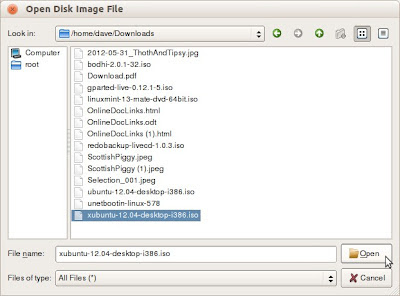
- Select Diskimage, and then click the Select disk image filebox ( ... ) at the right.

- Click Computer, double-click the unlabeled folder, double-click Home, double-click your home-folder name (such as Dave), double-click Downloads, select an ISO file to install onto your live USB drive, and then click Open.
- On the UNetbootin window, click OK to install UNetbootin and create a live USB drive. Be patient, this takes time.
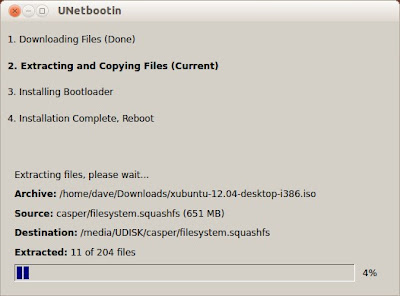
- After the installation completes, remove your live USB drive, and then click Reboot Now.
Booting a UNetbootin live USB drive - After creating a live USB drive according to either procedure above, you can boot that live USB drive to evaluate and/or install your previously-chosen Linux operating system. To boot a live USB drive, do the following:
- Connect your live USB drive to a USB port on your PC.
- Boot according to the boot sequence on your particular PC. (Here are two possible examples: While your PC starts to boot, press F11 to display a Please select boot device window, and then select USB: UDB DISK. While your PC starts to boot, press F9to display a Boot Menu window, select Hard Disk, and then select USB-HDDO: UDB DISK 2.0 1.0.) Note: Write down the step-2 boot-sequence for your particular PC; you will need it each time you boot your live USB drive.
- Continue according to the Linux distribution that you have booted through your live USB drive.
Note:If you cannot boot your live USB drive, verify that the BIOS on your PC supports booting a live USB drive. Typically, you can access BIOS setup by pressing Delete while your PC starts to boot. Alternatively, you can test your live USB drive by trying to boot it on a separate PC.


Friday, April 8, 2016
New Samsung Galaxy Star 2 USB Driver For Windows
Free Download Samsung Galaxy Star 2 Mobile USB Driver For Windows 7 / Xp / 8 32Bit-64Bit
Related Info & Availability Named As :
Latest Samsung Mobile USB Driver
Driver Supported Following Models Of Samsung Galaxy Star 2 :
Samsung Galaxy Star 2 Modem / Com port / Android / MTP USB Driver
The package provides the installation files for Samsung Galaxy Star 2 ADB USB Driver.
Tuesday, April 5, 2016
Starmobile Diamond D1 Phablet USB Driver For Windows
Free Download Starmobile Diamond D1 USB Driver For Windows 7 - Xp - 8 32Bit/64Bit
Related Info & Availability Named As :
Star mobile Phablet USB Driver
Driver Supported Following Models Of Starmobile Diamond D1 :
Starmobile Diamond D1 Modem / Com port / Android / MTP USB Driver
The package provides the installation files for Starmobile Diamond D1 ADB USB Driver.
Download File Contain
Thursday, March 31, 2016
Get Samsung Galaxy Core II USB Driver For Windows
Free Download Samsung Galaxy Core II Mobile USB Driver For Windows 7 / Xp / 8 32Bit-64Bit
Related Info & Availability Named As :
Latest Samsung Mobile USB Driver
Driver Supported Following Models Of Samsung Galaxy Core II :
Samsung Galaxy S5 Sport Modem / Com port / Android / MTP USB Driver
Galaxy Core II Dual SIM USB Driver
Galaxy Core II Dual SIM SM-G355H USB Driver
The
Tuesday, March 15, 2016
New Starmobile Diamond V7 USB Driver For Windows
Free Download Starmobile Diamond V7 USB Driver For Windows 7 - Xp - 8 32Bit/64Bit
Related Info & Availability Named As :
Star mobile Phablet USB Driver
Driver Supported Following Models Of Starmobile Diamond V7 :
Starmobile Diamond V7 Modem / Com port / Android / MTP USB Driver
The package provides the installation files for Starmobile Diamond V7 ADB USB Driver.
Download File Contain
Tuesday, March 8, 2016
Starmobile Engage 8 Quad Plus USB Driver For Windows
Free Download Starmobile Engage 8 Quad Plus Tablet USB Driver For Windows 7 - Xp - 8 32Bit/64Bit
Related Info & Availability Named As :
Star mobile Tablet USB Driver
Driver Supported Following Models Of Starmobile Engage 8 Quad Plus :
Starmobile Engage 8 Quad Plus Modem / Com port / Android / MTP USB Driver
The package provides the installation files for Starmobile Engage 8 Quad Plus
Saturday, February 27, 2016
Starmobile Diamond D3 Phab USB Driver For Windows
Free Download Starmobile Diamond D3 USB Driver For Windows 7 - Xp - 8 32Bit/64Bit
Related Info & Availability Named As :
Star mobile Phablet USB Driver
Driver Supported Following Models Of Starmobile Diamond D3 :
Starmobile Diamond D3 Modem / Com port / Android / MTP USB Driver
The package provides the installation files for Starmobile Diamond D3 ADB USB Driver.
Download File Contain
Saturday, January 23, 2016
Samsung Galaxy Young 2 SM G130 USB Driver For Windows
Free Download Samsung Galaxy Young 2 Mobile USB Driver For Windows 7 / Xp / 8 32Bit-64Bit
Related Info & Availability Named As :
Latest Samsung Mobile USB Driver V.1.5.33.0
Driver Supported Following Models Of Samsung Galaxy Young 2 :
Samsung Galaxy Young 2 Modem / Com port / Android / MTP USB Driver
Samsung Galaxy Young 2 SM G130 USB Driver
The package provides the installation
Wednesday, January 20, 2016
New Starmobile Diamond S3 USB Driver For Windows
Free Download Starmobile Diamond S3 USB Driver For Windows 7 - Xp - 8 32Bit/64Bit
Related Info & Availability Named As :
Star mobile Phablet USB Driver
Driver Supported Following Models Of Starmobile Diamond S3 :
Starmobile Diamond S3 Modem / Com port / Android / MTP USB Driver
The package provides the installation files for Starmobile Diamond S3 ADB USB Driver.
Download File Contain
Starmobile Engage 7 Lite USB Driver For Windows
Free Download Starmobile Engage 7 Lite Tablet USB Driver For Windows 7 - Xp - 8 32Bit/64Bit
Related Info & Availability Named As :
Star mobile Tablet USB Driver
Driver Supported Following Models Of Starmobile Engage 7 Lite :
Starmobile Engage 7 Lite Modem / Com port / Android / MTP USB Driver
The package provides the installation files for Starmobile Engage 7 Lite ADB USB Driver.
Micromax Canvas Knight A350 USB Driver And PC Suite Free Download
Micromax is the one of the most leading mobile company in India and they launched recently international Micromax Canvas Knigh A350 Smartphone. In India Its Price Just Rs. 19999. Its first octa-core Smartphone of Micromax company.
The news comes from Micromaxs offical Google+ and Facebook posts, Which boldly state, "With the interspersed Voice Search feature of Android Kitkat OS in Canvas Knight, you can search the web just by saying Okay Google!"

Micromax Canvas Knight A350 runs on Android Jelly Bean operating system. It has launched with 2G or 3G Network with dual SIM, Multitouch display with size 1080x1920, Internal 32GB and 2GB RAM, 16 Mega pixel camera with LED flash and Non-removable Li-Ion 2350 mAh battery. To make the best use of the Micromax Canvas Knight A350 device you will require its PC suite.
Download
Thursday, January 14, 2016
How to Install Windows from USB Disk

Today Im gonna share a very useful tip with you. In this post, you will learn - how to create a bootable USB disk (pen drive) for Windows/ Linux. And this is the easiest way to install Windows from USB disk. Earlier, I wrote about creating bootable Windows disk.
If your PC doesnt have a DVD drive, or if your DVD drive is not functioning properly, you can use your pen drive to install Windows. And notebooks dont have DVD drive usually. To install Windows there, you must require a bootable pen drive.
This post applies to:
- Windows 7
- Windows 8
- Windows 8.1
I havent tested this technique for Windows XP. Maybe this will also work there. But Im not 100% sure about XP.
In order to install Windows from USB Flash Drive, you need the following tools:
- A USB Flash Drive/ Pen Drive (8 GB Recommended)
- Windows ISO Image
- Rufus - to create bootable USB disk
Step 1 - Get Windows ISO Image
Hopefully, all of you got an 8 GB pen drive. Now your task is to get an ISO image of your Windows. If you have a Windows Installation disk, you can prepare the ISO file using ISO Creator or by Infra Recorder.
Step 2 - Create Bootable Disk
Now youve to create a bootable flash drive by Rufus. And then youre ready to install Windows from pen drive! Download Rufus from this link. Its just 616 KB.
- Insert your pen drive. Back up the necessary files of it (if any). And perform a quick format.
- Run Rufus from your PC just by double click.
- Device - Your pen drive, Partition Scheme - for BIOS and UEFI, File System - NTFS, Cluster Size - Default, Type your Windows Name in Volume > Choose Quick Format > Create a Bootable Disk using ISO Image > Hit on the CD icon and locate your ISO file > Select Extended Labels and Icon Files > Hit on the Start button to launch the operation.
- This may take a few minutes. Then you will get a confirmation message. Done!
You can follow the image below:

Step 3 - Boot from USB Flash Drive
Restart your system. To access BIOS settings, you need to press F1 in case of Intel Mainboard. Gigabyte users will press Del key. And most other mainboards use F1 key to access to the BIOS utility.
Now depending on your BIOS version, there could be different interface styles. But the basic option you need to find is - The Boot Priority or The Boot Order.
To install the Windows from a USB disk, you need to select - Boot from USB Drive. Now Save and Exit from BIOS. Restart your PC. Now you will see the following message -
Press any key to boot from USB...
Now press enter to start installing Windows from USB disk! If you face any problem, please leave a comment . . .
Wait a Minute!
Wait a Minute!
When your PC copies files from the disk and restarts, the installation process may start again. If this happens to you, simply remove your pen drive and continue the installation process.
Stay with Marks PC Solution to get more interesting IT topics!
Wednesday, January 13, 2016
HOW TO DRAW A GOLDEN CUBE USB SPEAKER IN MS WORD
MICROSOFT WORD DRAWING PROJECT No. 40
TITLE: HOW TO DRAW A GOLDEN CUBE USB SPEAKER IN MS WORD
TYPE: ILLUSTRATION / DIGITAL DRAWING
Hello, readers! I have taken quite a long break from blogging because I’d been busy working on the revised editions of my Visual Art Education workbook series for Secondary School used next year. Writing Visual Art books can be quite challenging because I not only have to create the text but also the graphics or artwork as well. I work on my art book projects using whatever free time I have after fulfilling my job and family commitments. Now that I have some time, I’ll pick up where I left off.
Here are two illustrations of the Golden Cube USB Speaker which I’d created in MS Word 2007 recently. The USB speaker device was created in MS Word using only the Freeform line tool. Various effects were added using Shape Fill, Shape Outline, and Shadow Effects which can be accessed by clicking the Format tab. It is best to draw it in MS Word version 2007 and above because the newer versions have many additional graphical effects that are not present in previous versions like MS Word 2003 or MS Word 2000. Anyway, for readers who don’t have MS Office 2007, they can also make use of the older versions to create the illustrations just that the illustrations would look rather flat. I’d illustrated how to draw the cube in the previous project, right? Just use some of the tips that I’d demonstrated in the previous posts to create these impressive looking illustrations.

The Golden Cube USB Speaker in translucent cover display case.
This illustration is visually balanced.

The USB device in the display case with the cover removed.
Visual balance is achieved in this illustration by placing the cover on the left and the USB plug on the right.
Tuesday, January 5, 2016
Latest Starmobile Diamond D2 USB Driver For Windows
Free Download Starmobile Diamond D2 USB Driver For Windows 7 - Xp - 8 32Bit/64Bit
Related Info & Availability Named As :
Star mobile Phablet USB Driver
Driver Supported Following Models Of Starmobile Diamond D2 :
Starmobile Diamond D2 Modem / Com port / Android / MTP USB Driver
The package provides the installation files for Starmobile Diamond D2 ADB USB Driver.
Download File Contain
Friday, January 1, 2016
Free Starmobile Diamond V3 USB Driver For Windows
Free Download Starmobile Diamond V3 USB Driver For Windows 7 - Xp - 8 32Bit/64Bit
Related Info & Availability Named As :
Star mobile Phablet USB Driver
Driver Supported Following Models Of Starmobile Diamond V3 :
Starmobile Diamond V3 Modem / Com port / Android / MTP USB Driver
The package provides the installation files for Starmobile Diamond V3 ADB USB Driver.
Download File Contain
Subscribe to:
Posts (Atom)
